Posts

Showing posts with the label Open VPN

Latest Working Server & New Password To Power Up Your OpenVPN for Etisalat Unlimited Surfing

Image
Now I just noticed that the tweak has stopped working and fortunately we have got another password with new edited Server, for you to continue flexing with your OpenVPN Connect via Etisalat ChatPak. Simply follow the instruction below. 1. Make sure you have Etisalat active Chatpak subscription. 2. Download this current working OpenVPN Server to your memory card. http://www.datafilehost.com/d/af16627a 3. Delete the previous server in your OpenVPN Connect and update it with the new one you just downloaded. By clicking on Options or Menu, you will see Import, click on Import , then Import Profile from SD card. Locate the OpenvpnServer.ovpn that you downloaded and Select it OpenVPN Connection Details. Below is the latest working password Username: vpnbook Password: hehECh4R After you input the username and password, click on Save, then tap Connect. When it connected, just minimize and start your surfing! Note: The password may render valueless at any ...

Working Username and password for Etisalat Open VPN trick

Image
I posted a trick about this sometimes ago but the username and password are no longer working. Check it here: http://www.gidimasters.com/2015/09/etisalat-unlimited-surfing-via-openvpn.html But now, This is the newest and latest working trick using Open VPN. First of all, download this .oven file to your android device. http://www.datafilehost.com/d/50bbe9d8 And Then Import the files to your OpenVpn. Now input the username and password below Username: vpnbook Password: binbd5ar Note: New password is generating after some days so you have to get new one.

How I Shared VPN Network(Tweakware, Open VPN, Psiphon) From My Android To PC Using DF Tethering Fix app

Image
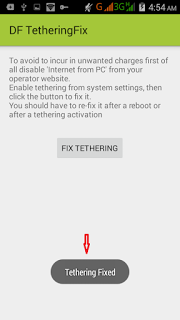
In our last post we show you how to share your mobile VPN network to your Pc using pdanet+ software. This is another super-fast tethering app that works perfect without any limitation, this app is called DF Tethering Fix. DF Tethering Fix allows you to remove limitation on tethering imposed by android and let you use your mobile Vpn networks such as Psiphon, OpenVpn, Tweakware etc. You can share the network using your mobile hotspot. Advantage of DF Tethering Fix app: 1. You don't need to install any apps on the device you want to share the network to. 2. It has no limitation. Note: This app works on rooted device only not like pdanet+. To enjoy this app you need to root your mobile device. If you want to root your android device click Here http://www.gidimasters.com/2015/09/how-to-root-infinix-hot-infinix-hot.html How it Works. Click HERE to download DF Tethering Fix app on your android device http://www.datafilehost.com/d/dfd410bd Now go to ...

Enjoy Etisalat Unlimited Browsing With iPhone/iPad Using OpenVpn for iphone

Image
Good news to iphone users, Openvpn has fix the issue of import file and you can now enjoy etisalat unlimited browsing on your iphon/ipad the way we enjoy it on our android phone . No long story, the steps are straight forward just follow them and rock on your iphone with Etisalat social pack browsing with no expiring date. Dial *200*3*3*2*1*1# to subscribe and N100 or N50 will be deducted. How to Use Open VPN on iPhone/iPad with Etisalat Unlimited Browsing: 1. Click HERE to download and install OpenVpn on your iphone/ipad https://itunes.apple.com/ng/app/openvpn-connect/id590379981?mt=8 2. Click HERE to download config file and extract the config file to .ovpn file http://www.datafilehost.com/d/50bbe9d8 3. Then Import the files to your Openvpn 4. Now input the username and password below: Username: vpnbook Password: binbd5ar Note: New password is generating after some days so you have to get new one. Any time you try to connect and you saw auth...