Posts

How To Place Ad Code On Your Blog

Image
I was surfing through a forum few days ago and a guy asked how to place ad codes on blogger's blog. Then I decided to write on this. For you to place any ad code on your blog, You must have gotten your ad code. Kindly follow the steps below: Firstly, Login to your blogger dashboard as you can see in the image below... In The Blogger Dashboard scroll down to LAYOUT and click on it as seen in the image below.  A new page will appear as seen below. Just surf around the new page a find a suitable bar to place your ad code...  But i advice you place it in the sidebar and below title navigation bar so it will be visible to all visitors in your blog. When you are done click on ADD A GADGET button. A new page will show as seen below then click HTML/ JAVASCRIPT. A page will pop up then you will see a box/textfield to post in the Ad Code... Finally, Click on save button... Check Your Blog to see the ads displaying... Have A Nice Day. 
How To Add/Invite Author To Blogger Blog

Image
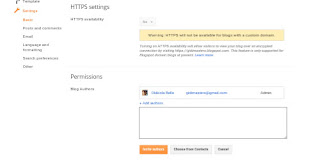
Goodday, Im writing this in favour of the newbie blogggers who don’t know how to add/ invite another blog admin or moderator to their blog so as to administer it in their absence. Well to do this, It wont take much of your time as it is present in your blogger dashboard. So by now, if you don’t know how to invite your friends or co-worker to manage your blog, kindly follow the steps below: Firstly, there are two priviledges you can give your new author i.e 1. Add an author to only post to your blog and nothing else(The author wont be able to do anything else other  than just to post). 2. Add an author to have the same right you have as an admin(The author will be able to do and undo anything on your blog).  So adding an author depends on how well you trust the admin to be. STEPS TO FOLLOW: Login to your Blogger Dashboard. Click on the blog you want to apply this changes to. Go to the settings tab and click the Basic Option. Locate the Permissi...

My Personal MTN BBlited Settings Using Psiphon

Image
Good day Our Esteemed Reader,  Since I received lots of text via my phone concerning the Etisalat chat pack stuff,  so I decided to share with you my Personal MTN BBlited configuration.  Just follow the instructions below:  1. Launch your Psiphon VPN,  and configure it like the image below: 2. Click the save 🔲 button when you are through then select the tunnel whole device that will show in the next pop-up box.   3. Click on the the MORE OPTIONS button.  4. Tick the CONNECT THROUGH AN HTTP PROXY and fill it with the configurations below: 5. My  to the HOME tab and click the START Button.  

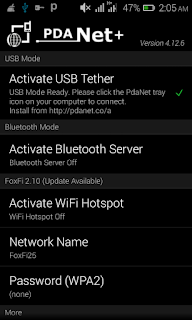
How To Share Psiphon Connection To PC Using PdaNet+

Image
Goodday To Our 

Top 7 Best Cloud Storage and Online Backup Service

Image
Cloud storage is an innovation under cloud computing. You can access office, anytime, anywhere or with any cloud enabled device. To simplify terms, Cloud storage is a means of storing data online or a model of data storage that is backed up and also managed remotely for the users in the Internet. With cloud storage, there are better benefits of greater reliability and accessibility, strong protection on backed up data, rapid growth and so on. Using cloud storage service helps to reduce cost or expenses on external drives or backup routine. However, invisibility benefits, that is, no physical presence is involved. It's safer to use cloud storage because of high security, protection, easy accessibility, syncing, easy recovery, sharing and highly automation. Hopefully, I was able to compile the 7 best cloud storage services for Online backup. 1. Google Drive Google drive is a very safe place for all your files. You can be able to store files of different ...

How To Use Psiphon Vpn With Your Airtel Sim (2016)

Image
This is the latest tweak for Airtel users for the year 2016. I know some of us are still flexing with Etisalat 0.00k and socialme cheat. Anyways, The wonderful thing about this tweak is that, old and new sim can utilize this cheat.. This is how to set this cheat to work. Kindly dial *522# to subscribe and after 24hrs validity, just dail this code *522*2# or instead, sms STOPOK2 to 7801 and re- subscribe to continue enjoying your browsing,, download and streaming. Nothing much, its just like the step done on Mtn music plus. You will get a confirmation text-message immediately you dial that code. Text like this; "Welcome! Download the App you like today! Click http://bit.ly/Airtel-wlcma Access is valid for N20/ day. To opt out, Text STOPOK2 to 7801 Open your psiphon and configure it with the settings below: Tick remove port Proxy Type: Reverse Proxy Proxy Server: bit.ly/Airtel-wlcma Real Proxy Type: Inject Real Proxy Server: Real Proxy Port: 3128 ...

Mtn BBLited Is Still Blazing Hard On Psiphon With New Settings

Image
For those that still dont know how to subscribe to MTN BB10, here is it. For the Daily plan, dial *216*3*1# - it cost just N70naira (Bblited) · For the Weekly plan, dial *216*3*2# - it cost N350naira (Bblitew) For the Monthly plan, dial *216*3*3# - it cost N1000 (Bblitem) For Android Users => Download and install Psiphon Handler. => Install it on your Android Device then create a new APN settings on your device as stated below. => Open your phone settings > navigate to more > then go to mobile network > Then, to access point names > Select Mtn, Then create new APN and configure as written below: => APN Type: default => APN: web.gprs.mtnnigeria.net => Proxy: 127.0.0.1 => Port: 8080 After setting it, Save and activate it as your default settings Now open your installed Psiphon Handler, in the handler menu, set it as follows: => Proxy type: Real Host => Custom Header: host: web.blackberry.com => Proxy server: w...